Review and export audit logs
Filter organization activity, inspect recorded events, and export matching records as CSV or JSON.
An Enterprise organization owner can open Settings → Audit logs in OpenHack. The log records activity by people and automation in the selected organization.
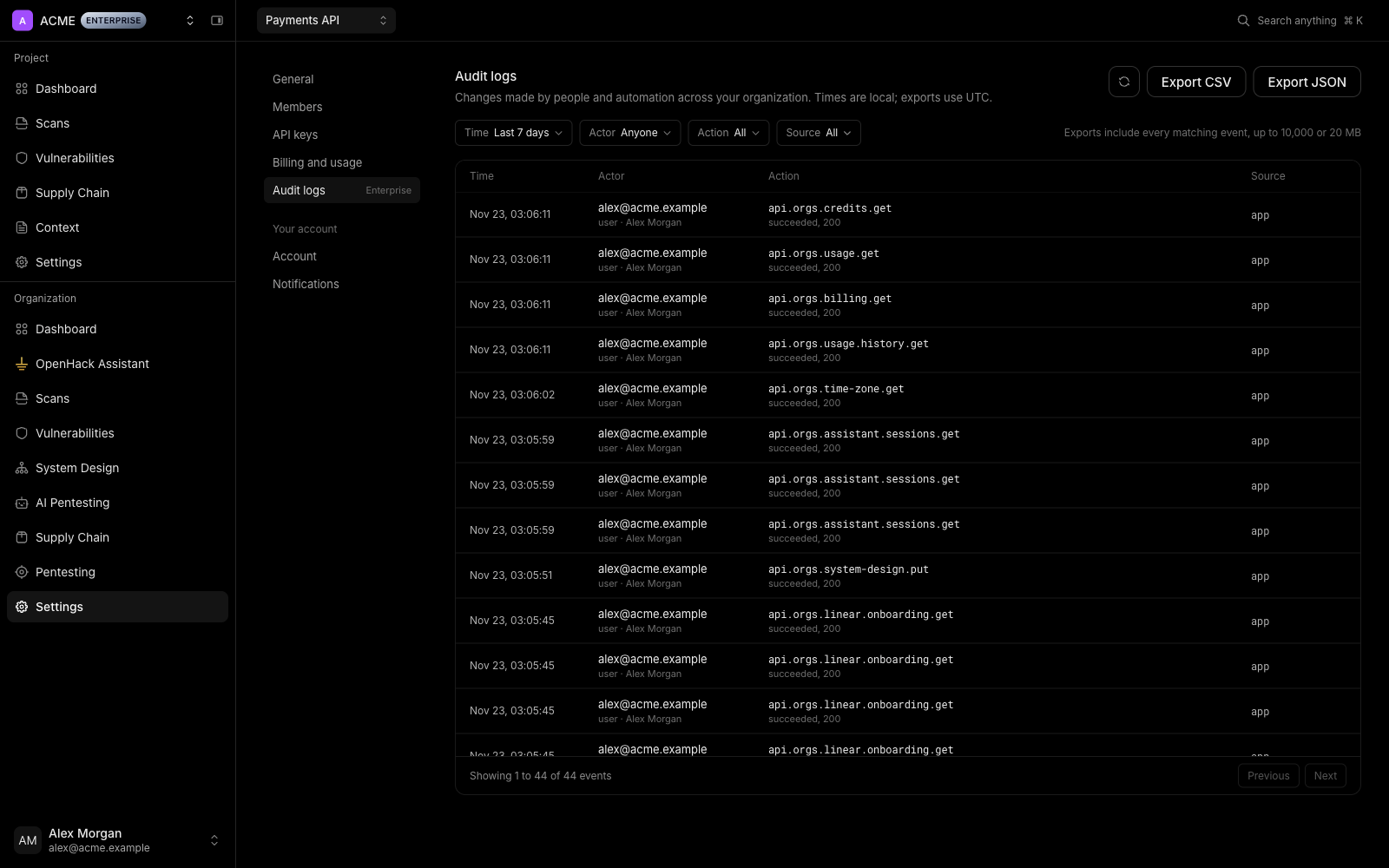
Use filters to find relevant activity before inspecting or exporting it. Actual product screen showing activity in the fictional ACME demo organization.
Find an event
- Confirm the selected organization.
- Choose Time to select a period, or enter a custom range.
- Use Actor to narrow to a person or actor type.
- Use Action and Source to narrow the activity further.
- Read the event’s time, actor, action, outcome, and source in the table.
- Select a row to open its details. Use Previous and Next to move through result pages.
Filter choices reflect activity recorded in the selected range. If nothing matches, widen the time range or clear a filter. Choose the refresh button to reload the log.
Export matching activity
Choose Export CSV for a spreadsheet-friendly file or Export JSON for structured records. Exports include every matching event, not just the visible page, up to 10,000 events or 20 MB. Narrow the filters if the export exceeds the limit, then export again.
The table displays local times; exports use UTC. Keep the selected filters and time zone with your review notes so another reader can reproduce the scope. Exported audit records can contain user and activity details; share them through your organization’s approved review workflow.