
In this article
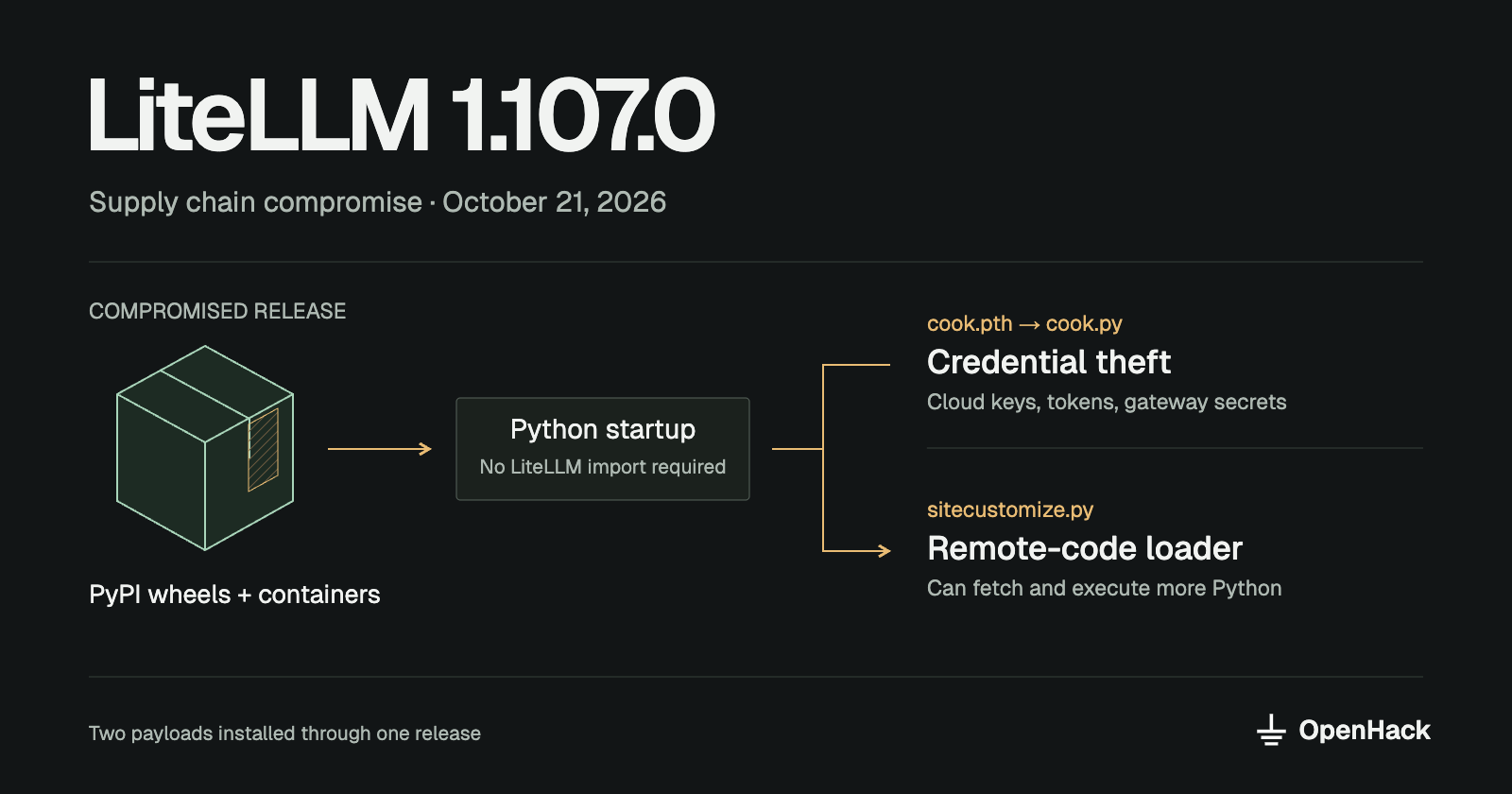
On October 21, 2026, LiteLLM 1.107.0 was published with a credential stealer and a remote-code loader. The compromise affected Python packages on PyPI and container images. LiteLLM is used to connect applications to multiple AI providers, so an affected deployment can expose credentials for more than one service. Upwind's investigation documents the malicious release.
If you installed or ran 1.107.0, isolate the affected environment and investigate it as a credential compromise. Do not start by running pip install there. The malware uses Python startup hooks, so even a maintenance command can trigger it. Rebuild from a trusted artifact and rotate exposed credentials from a clean system.
This article covers the October incident, separate from the March compromise involving versions 1.82.7 and 1.82.8. Information below reflects the reports available on October 21.
Who discovered it?
Upwind's security research team reported the malicious package in GitHub issue #47826, opened by Lidor Machluf at 12:06 UTC. Socket separately reported that its automated scanning detected malicious wheels seven minutes after publication. Socket's analysis describes that detection.
Wiz and SafeDep published further technical analysis. The discovery credit belongs to the researchers who identified and reported the malicious release; this article summarizes their findings and the response steps for affected users.
What was affected?
All seven platform wheels for litellm==1.107.0 contained the malicious files, covering Linux, macOS, and Windows distributions. The source archive had a modified build configuration but did not contain those payload files, according to the original report. Do not treat it as a trusted replacement. Affected artifacts and hashes.
The incident also affected these container repositories:
| Registry | Repository |
|---|---|
| GitHub Container Registry | ghcr.io/berriai/litellm |
| GitHub Container Registry | ghcr.io/berriai/litellm-database |
| GitHub Container Registry | ghcr.io/berriai/litellm-non_root |
| Docker Hub | docker.io/litellm/litellm |
The affected tags included v1.107.0, latest, main-latest, and main-stable. A mutable tag can point to a different image later. Check the digest actually pulled by your deployment, including cached images, against the published container indicators.
Responders identified 1.106.2 as the rollback version during the incident. That recommendation concerns this compromise; it is not a claim that the release has no other security issues.
What happened in the release process?
The malicious files were present in the distributed wheels but absent from the corresponding Git tag. Socket traced the compromised build to the lookalike repository Berri-AI/litellm. The legitimate repository is BerriAI/litellm, without the hyphen. This difference matters when reviewing build provenance: inspecting the legitimate source tag alone would miss the payload in the published artifacts. Socket's findings.
Wiz reports that BerriAI attributed the unauthorized release activity to three engineers' GitHub accounts, apparently accessed through stolen GitHub CLI OAuth tokens. One account triggered the release workflow and another approved it. The involved tokens were revoked. This is the reported account-compromise mechanism; the initial theft of those tokens should not be treated as independently established here. Wiz's incident analysis.
Timeline
All times below are UTC on October 21, 2026.
| Time | Event |
|---|---|
| 06:59 | The v1.107.0 Git tag was created. |
| 10:44 | Version 1.106.2 was uploaded to PyPI. |
| 11:20–11:37 | The malicious 1.107.0 wheels were built. |
| 11:39–11:40 | Version 1.107.0 was uploaded to PyPI. |
| 12:06 | Upwind opened the public security report. |
| By 13:23 | The report confirmed PyPI had removed 1.107.0, while affected container tags were still available. |
| By 17:13 | The report confirmed the affected mutable container tags no longer pointed to the malicious image. |
Build and upload times come from SafeDep's artifact analysis. Reporting and removal status come from the original issue. The final two entries are confirmation times, not exact removal times. Removal from a registry does not remove copies already installed or cached.
How the malware runs
The wheels install three files into the root of the affected Python environment's site-packages directory:
| File | Purpose |
|---|---|
cook.pth | Causes Python to import the malicious cook module during normal startup. |
cook.py | Contains the encoded credential-stealing payload. |
sitecustomize.py | Starts a background loader that can retrieve and execute additional Python code. |
The application does not need to import LiteLLM for these hooks to execute. Starting Python in the affected environment can be enough. This is why running a Python-based diagnostic or package-management command there is unsafe. Upwind's technical analysis.
Credential collection
The stealer searches for browser data, SSH and GPG keys, cloud credentials, shell history, environment variables, and AI service tokens. It also targets credentials stored by the LiteLLM gateway itself: the analyzed payload queries up to 500 rows from LiteLLM_CredentialsTable.
Collected data is encrypted using AES-256-CBC, with the encryption key wrapped using RSA-4096, then sent by HTTP POST to www.litellm[.]dev/healthcheck. This is attacker infrastructure, not the project's litellm.ai domain. The encryption means a network capture alone will not reveal the stolen contents. Wiz's payload analysis.
Additional code execution
The second startup hook launches a detached background process on supported systems. It periodically checks a file in an attacker-controlled GitHub repository for a server address, then can retrieve and execute Python code from that server. This gives the attacker a way to change the payload after installation.
SafeDep described hourly polling and the lock file /tmp/remote_code_loader.lock. Its investigation found the attacker repository unavailable when checked. The loader's capability does not establish that an additional payload was actually delivered. SafeDep's analysis.
How to check for exposure
Start with deployment records, lockfiles, package inventories, build logs, and container digests. Include developer machines, CI runners, temporary test environments, and production workloads. A short-lived container may still have had access to valuable secrets.
Inspect suspect files from a clean system or an offline copy. Avoid launching Python in the affected environment to ask which version is installed.
Useful indicators from SafeDep's investigation include:
| Indicator | What to look for |
|---|---|
cook.pth, cook.py, sitecustomize.py | Unexpected files in the environment's site-packages root. |
www.litellm[.]dev/healthcheck | Outbound credential-upload traffic. |
letters9813/pythonclient-test | The GitHub repository used to locate the next-stage server. |
/tmp/remote_code_loader.lock | A marker associated with the background loader. |
/tmp/.pc_once_72129118c59f5636c0bb | A marker written after a successful upload. |
A filename alone is not conclusive; sitecustomize.py can have legitimate uses. Compare contents or hashes with the published indicators. Absence of a marker also does not establish safety: temporary files can disappear when a container exits or a machine is cleaned up.
How to recover
For an affected installation, use this response order:
- Isolate and preserve. Stop the workload from communicating externally. Preserve relevant logs, image digests, package files, and disk snapshots before destroying the environment. Do not keep the application running while investigating it.
- Prevent reinstallation. Block 1.107.0 in dependency resolution and internal package mirrors. Quarantine cached wheels and affected container images. Check scheduled builds and automated dependency updates for paths that could reintroduce them.
- Revoke and rotate credentials from a clean system. Cover secrets the compromised process could read: AI provider keys, cloud credentials, repository and registry tokens, SSH keys, database passwords, and gateway credentials. Include provider keys stored in the gateway database, not just environment variables. Revoke active sessions and temporary credentials where the provider supports it.
- Rebuild the environment. Use a fresh host, runner, or container as appropriate, with a verified package version and trusted image digest. The incident-time rollback target was 1.106.2. Do not assume an in-place downgrade removes a detached process or reverses any actions it already took.
- Review downstream activity. Look for unusual cloud API calls, repository changes, new credentials, AI API usage, and unexpected spending from the exposure window onward. Use those findings to expand the incident scope if necessary.
Registry removal and a clean reinstall stop distribution and replace files. They do not invalidate stolen credentials. Recovery needs both a trusted runtime and revocation of the access the attacker may have obtained.

Ananay Arora
Founder, OpenHack